GOOGLE ADS · SIGNAL FEED
See the signal.Cut the waste.Scale what wins.
The operational command center for teams buying traffic on Google Ads — account health, spend, revenue, approvals and risk across every account, in one view.
- Your own Google Ads script and postbacks
- AdsTracker holds no Google credentials and never signs in
- One script into Google Ads, no spreadsheets
- Realtime Monitoringaccounts report every hour
- Threshold and anomaly rulesyour thresholds, plus a per-account baseline
- Winning Advantagefind winners, scale faster
Active Signals
Hot Alerts
Engagement
ROAS Potential
- Eco Bottle 50% OffUS · Shopify12.4K+32.5%
- Wireless EarbudsUS · TikTok9.7K+28.1%
- Smart Watch X1UK · Facebook8.1K+19.3%
- High
- Medium
- Low
- You send the dataStats reach AdsTracker from a script you paste into your own Google Ads account, plus the postbacks you point at it. AdsTracker holds no Google credentials and never signs in.
- Organization isolationEach tenant's data is fully partitioned. No cross-org leakage, enforced at the data layer.
- Alerts where you already areAnomalies reach you in Telegram and the app inbox, with a browser push for the critical ones — no dashboard to keep open all day.
- Built in the openWe name our limits rather than hide them: no email channel, no public API, no access to your Google Ads account.
The status quo
Media buying breaks when signals are scattered.
At scale, the difference between a winning campaign and a quiet loss is whether you can see it in time. Across hundreds of Google Ads accounts, fragmented tooling hides exactly the signals that matter.
Spend waste is hidden
Budgets bleed across hundreds of accounts before anyone notices the underperformers dragging ROI down.
Accounts go silent
A profile stops reporting and the first signal you get is missing revenue — not an alert that something broke.
Approvals slow teams down
Disapprovals and limited ads pile up in places no one is watching, stalling launches for days.
Everything lives apart
Domains, proxies, buyers, and finance each sit in their own tool, so no one sees the full picture at once.
Command center
One place for accounts, spend, risk, and action.
Stop stitching together spreadsheets and tabs. Every Google Ads account's health, money and signals land in a single operational view.
- Spend, revenue, ROAS and CPA across every account in one view.
- Status, approvals and at-risk accounts surfaced before they cost you.
- Filter by segment, drill into a profile, and act without leaving the page.
Spend
+6.4%vs prev period
Revenue
+11.2%vs prev period
ROAS
+0.18xvs prev period
CPA
-3.1%vs prev period
| Account | Status | Spend | ROAS |
|---|---|---|---|
| Aurora Media — US | Active | $12.4k | 3.10x |
| Northwind — EU | Active | $9.8k | 2.74x |
| Helio Performance | Limited | $6.2k | 1.92x |
| Vertex Buyers — UK | Active | $5.5k | 2.40x |
| Cobalt Reach — LATAM | Paused | $0.0k | — |
Illustrative sample data. Live figures come from your synced accounts.
Signal detection
Eight kinds of problem, on your thresholds.
Every connected account reports in every hour, and each rule you set is re-checked every 15 minutes. The alert names the rule that fired and the account it fired on.
Cost per lead left its range
P1anomaly · against the account’s own 7-day baseline
+38%The script went quiet
P1script_silent · no report for 3 hours
6 h silentSpending, nothing coming back
P1zero_conversions · spend past $50
0 convApproval rate below your floor
P2approval_drop · under 80%
71%An account went down
P3account_banned · status turned suspended
suspended
How it works
See the signal. Cut the waste. Scale what wins.
Every account, one live pulse.
Signal Scout watches spend, revenue and risk in real time and surfaces the anomaly the moment it appears.
Stop the spend that isn't working.
Wasted budget drops as soon as you act — one clear view turns noise into a decision.
Pour fuel on the winners.
ROAS climbs as you double down on the campaigns the signal proved out.
The product
This is the actual application.
Not a rendering of it. Seven screens from the running product — what you watch, what it tells you, where the money lands, and how it reaches you away from the desk.

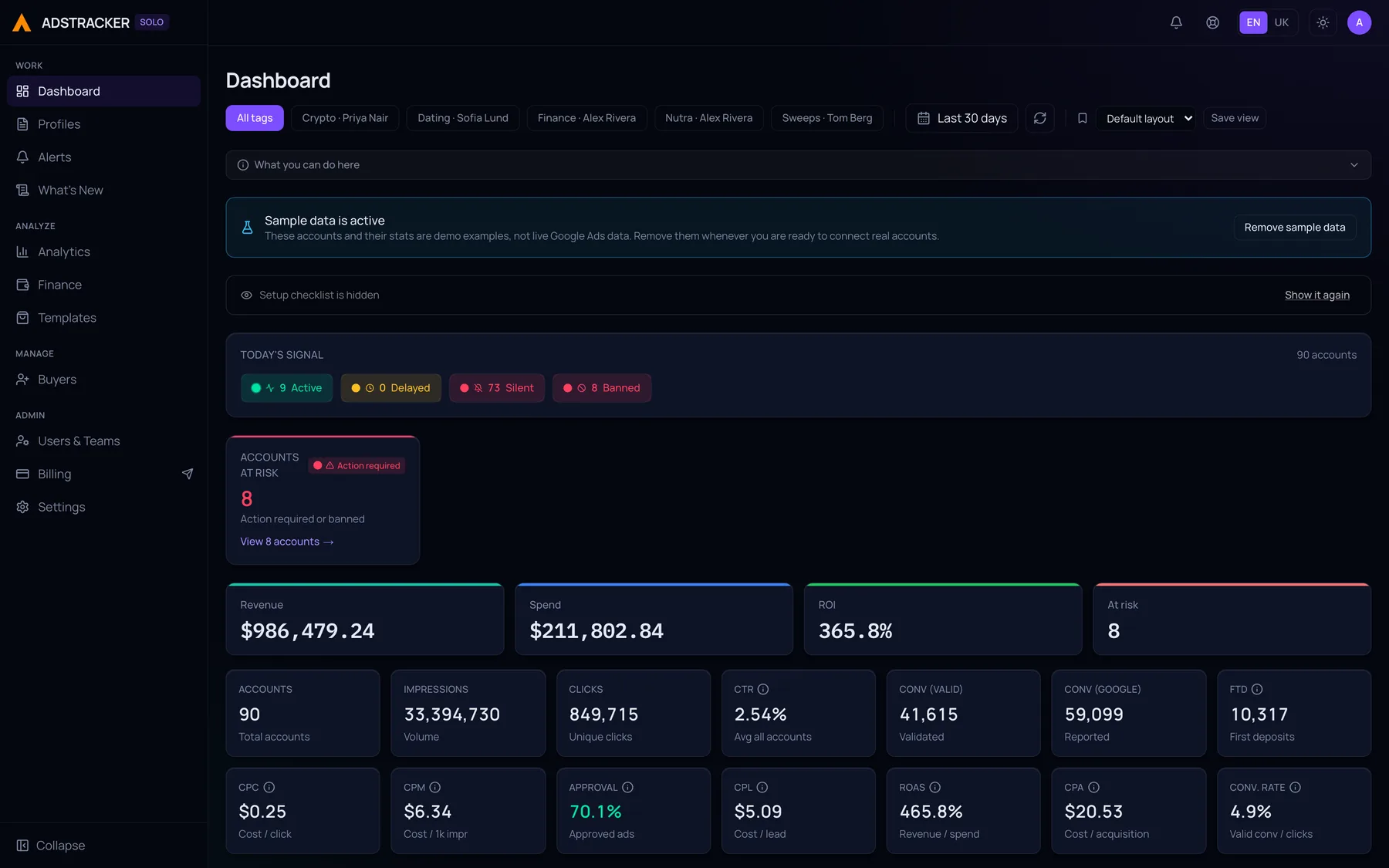
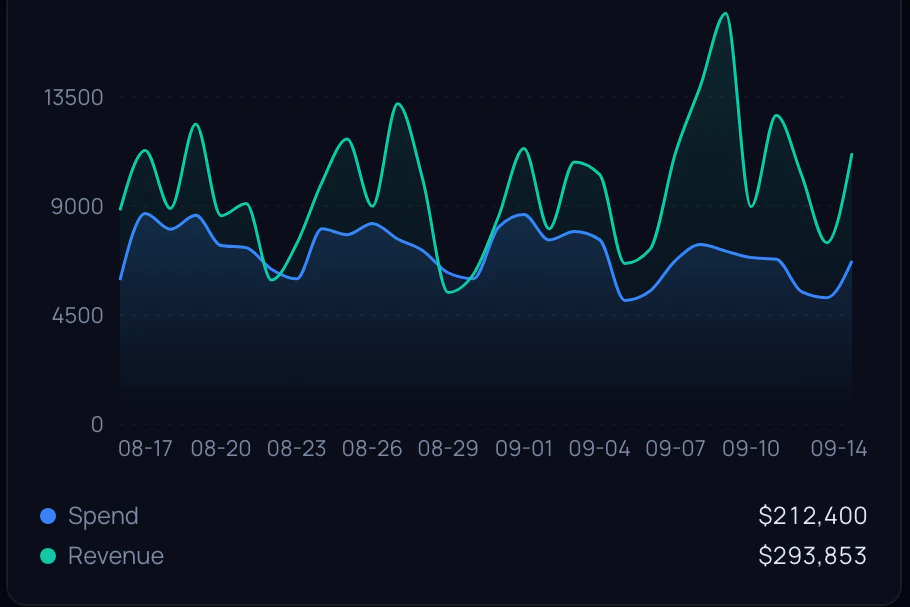
The dashboard
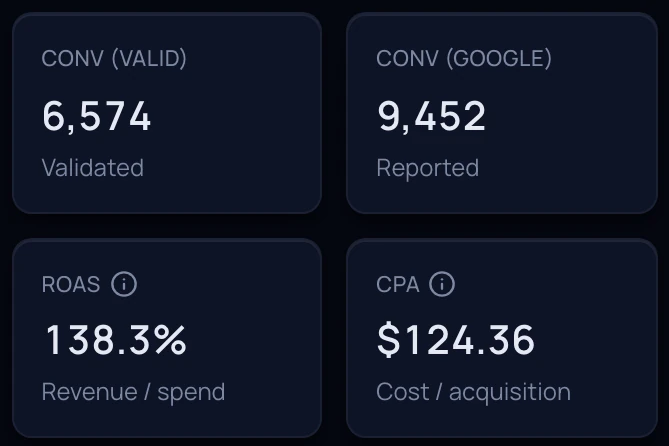
Spend, revenue, ROI, ROAS, CPC, CPM and CPA across every account you have, over the range you pick.
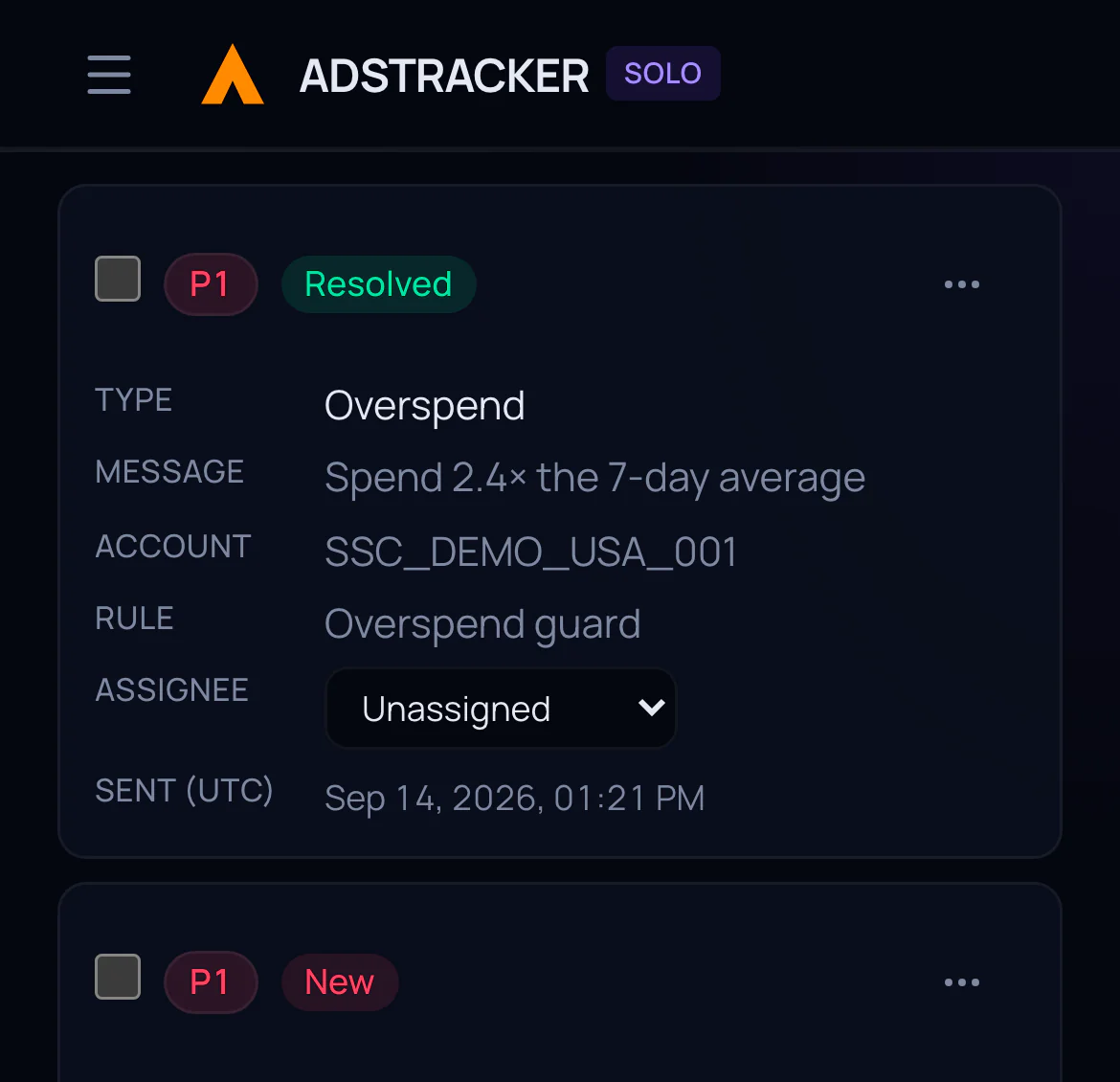
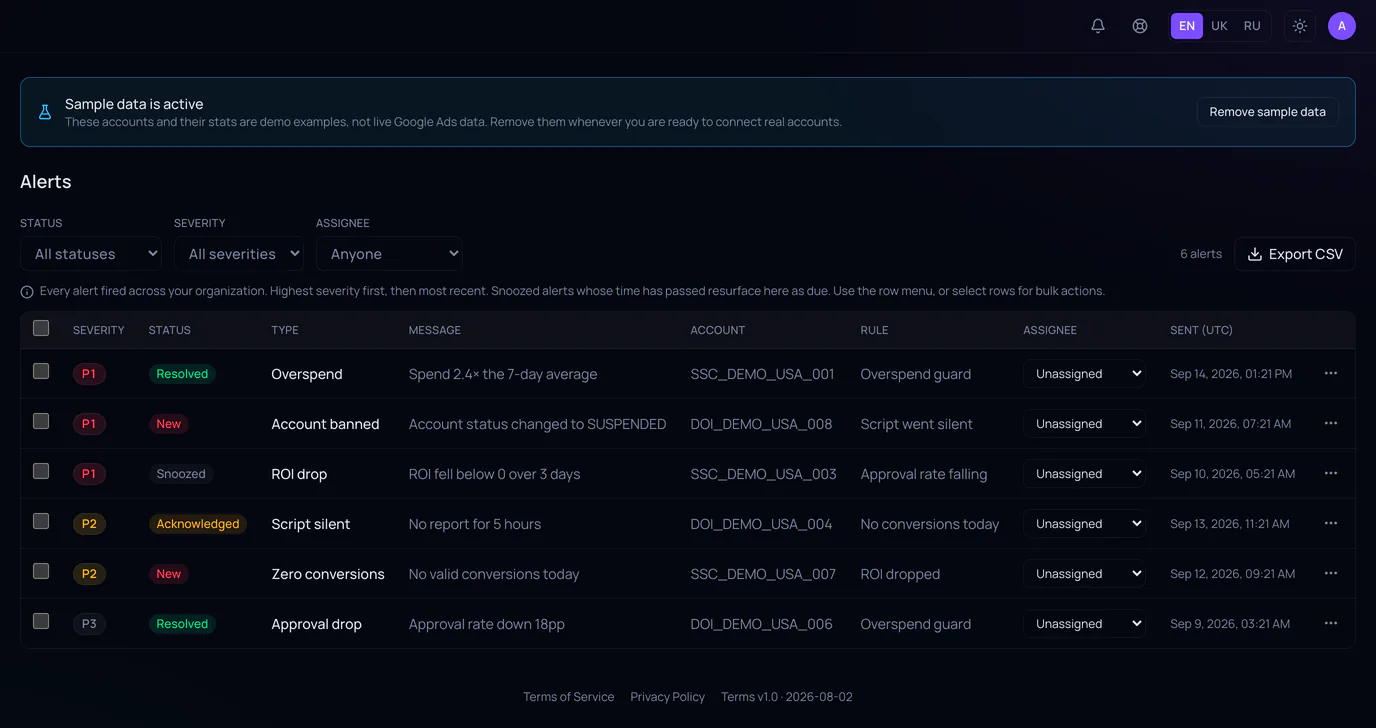
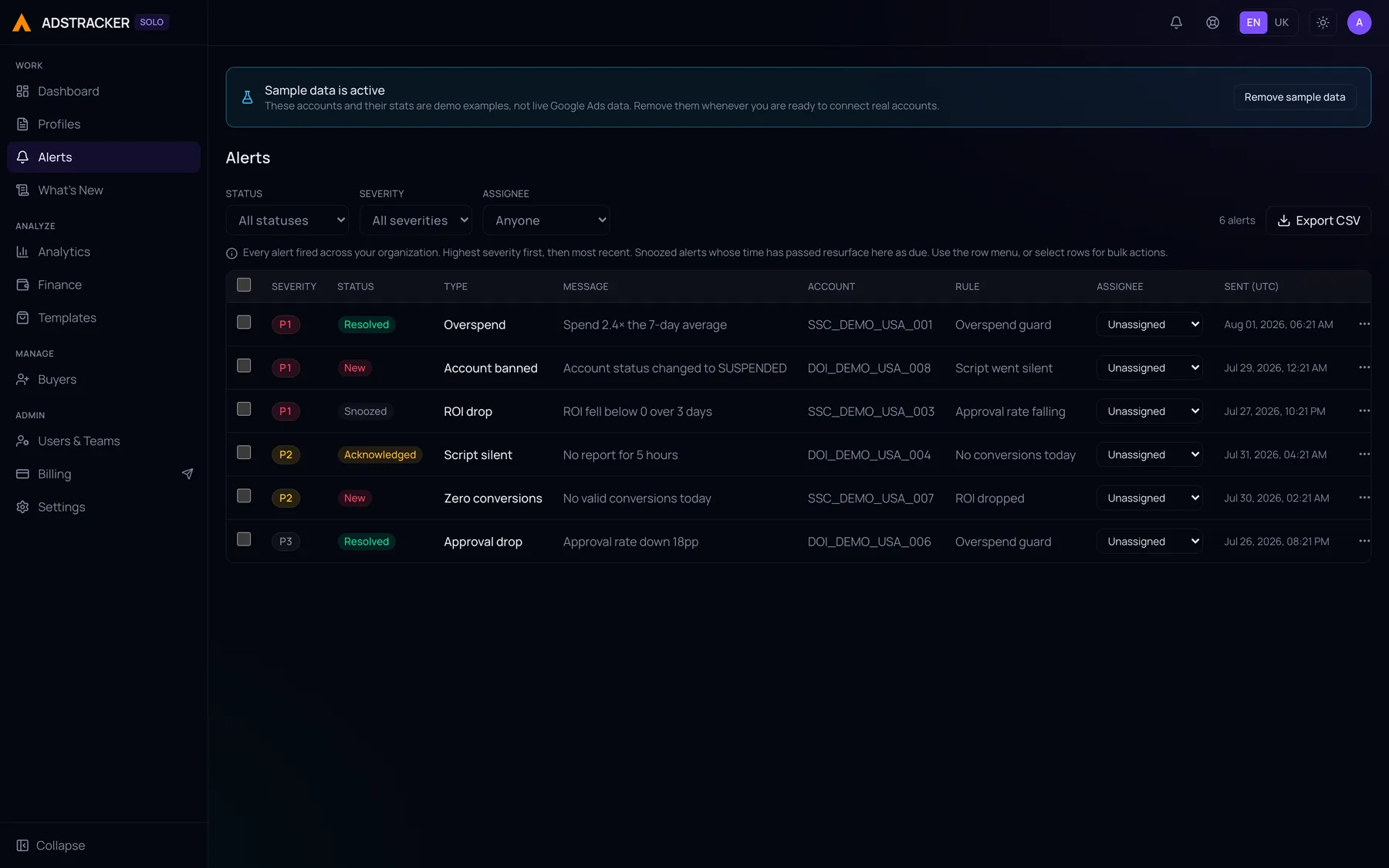
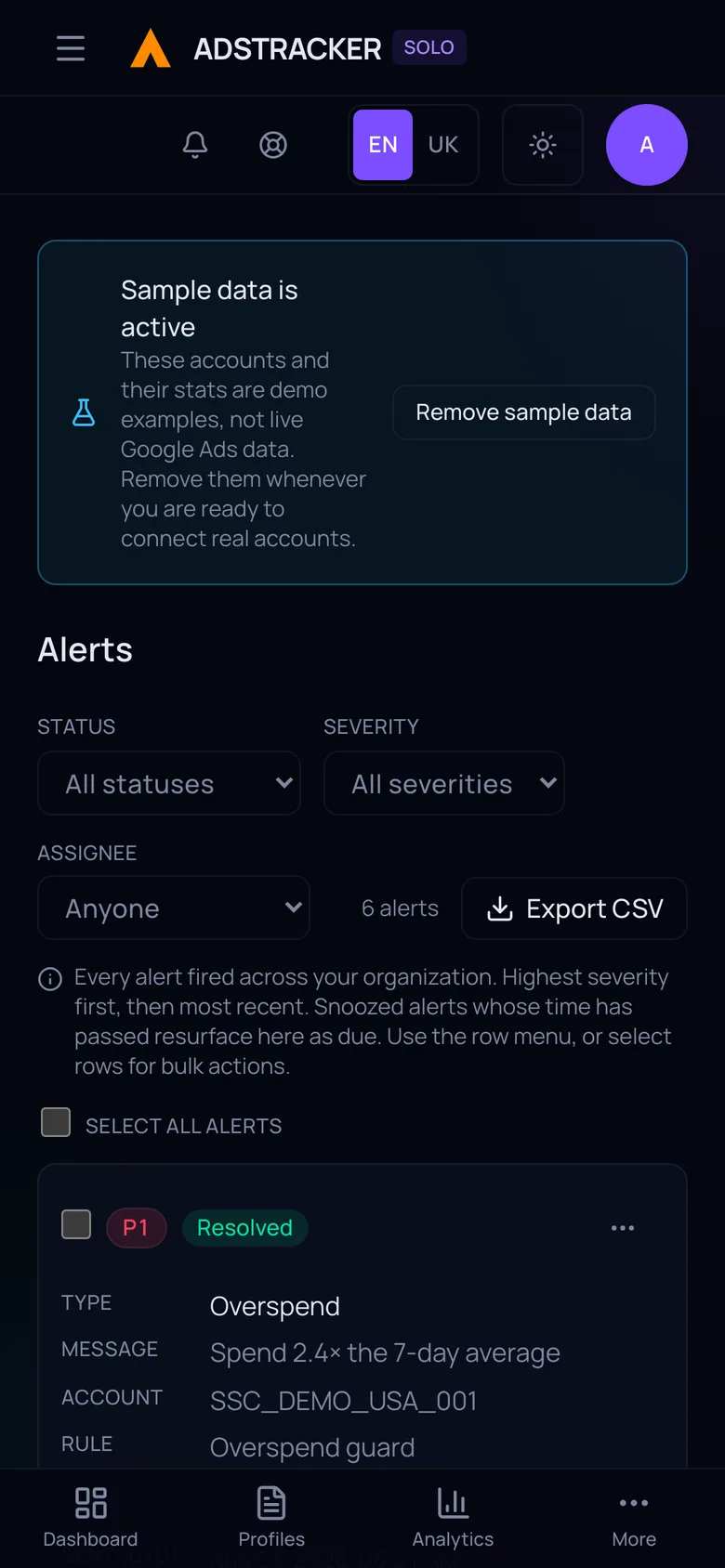
The alert inbox
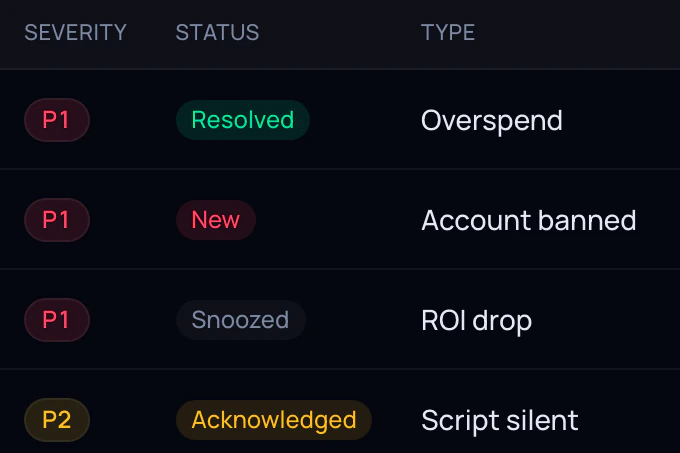
Every alert with the rule that fired it, its priority, who it is assigned to, and whether it is new, acknowledged, snoozed or resolved.
Every account in one table
Status, running campaigns, budget, cost, cost per lead, revenue and ROI — per account, with a total across all of them.

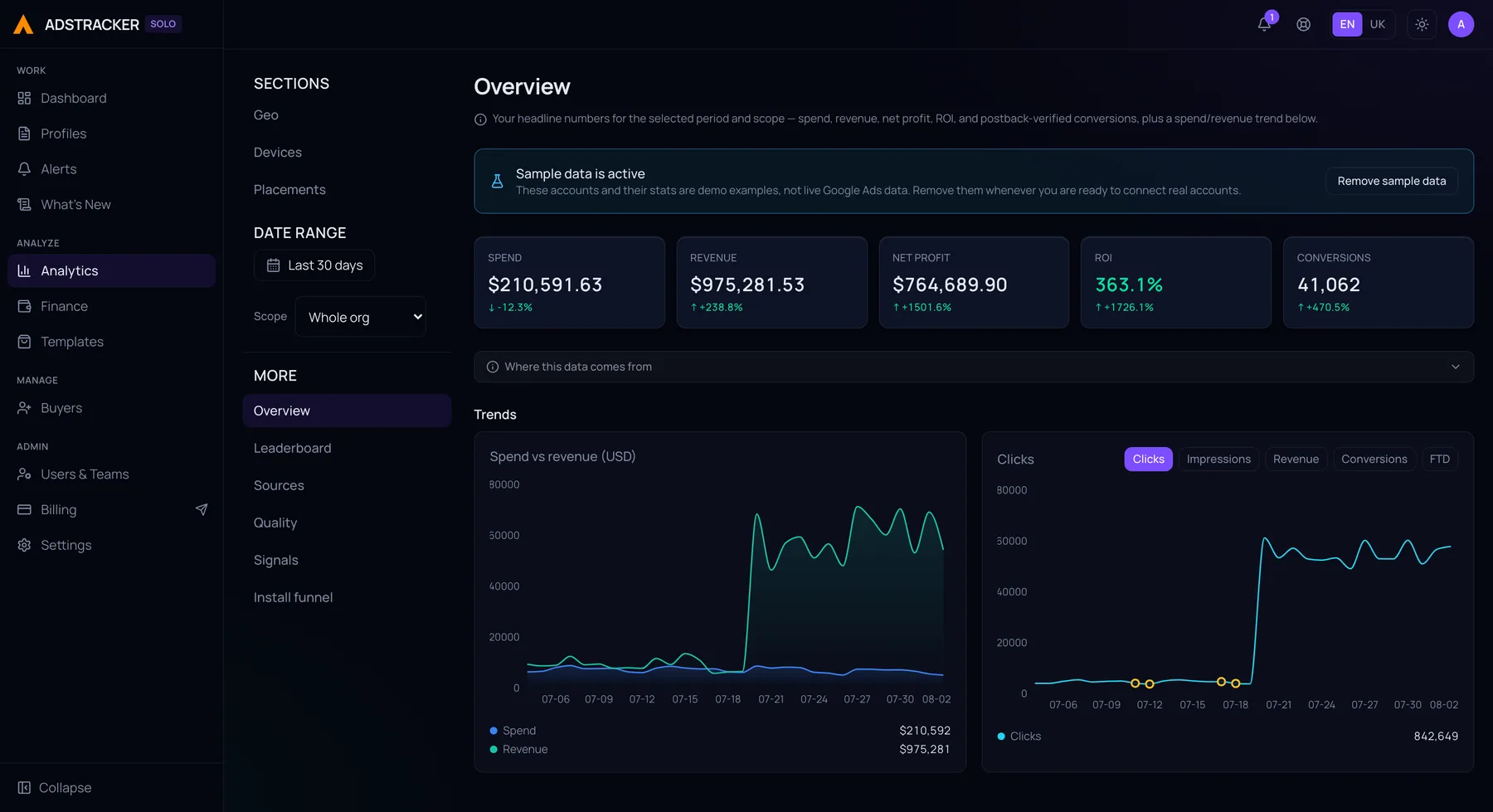
Where the money goes
Spend by country, on a map and in a table. Sources, devices, placements and traffic quality each get their own view.

What is winning and what is bleeding
Best and worst ROI, top revenue, top net profit — and the two lists nobody else builds: money drain and dead scripts.

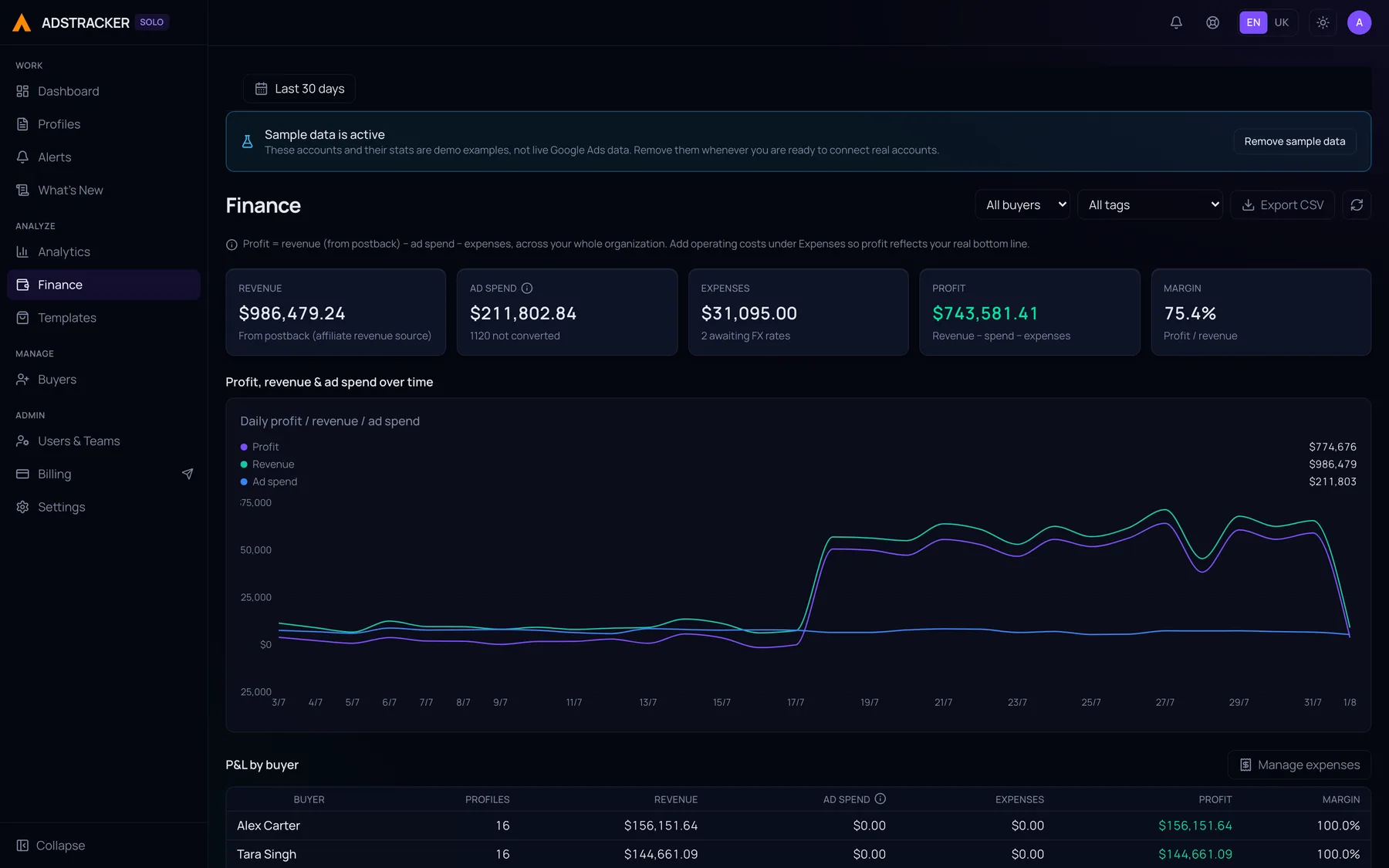
The P&L, per buyer
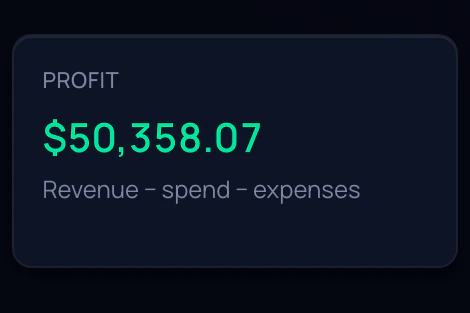
Revenue, ad spend, the expenses you enter by hand, profit and margin — then the same broken down by the person who spent it.

On the phone
Installs from the browser on Android and iOS, with its own bottom navigation. Browser push carries the critical alerts to the device.
Every figure in these screens is sample data, and the product says so itself — its own sample-data banner is inside each frame. One click loads that workspace, and one click removes it.
Modules
Every part of the operation, covered.
Eight focused modules that work together — from the first synced account to the monthly P&L.
Dashboard
Aggregate spend, revenue, ROAS and account health at a glance.
Profiles
Filter, search and manage every Google Ads account in one table.
Buyers
Group accounts by media buyer and track performance per person.
Analytics
Geo, sources, devices, placements, creatives and traffic quality, per account or across the org.
Finance
Profit and loss with revenue, spend and the expenses you enter by hand.
Alerts
Telegram notifications when accounts go silent or approvals dip.
Billing
Multi-tenant plans, trials and usage in one place.
Script / Webhook
Generate a per-account Google Ads script that reports stats in every hour.
Integrations
One source of truth, wired to where you work
Google Ads is the source. Everything else exists to get a signal out of it and into the place you will actually see it.
The source
Google Ads
Google Ads is where the budget goes out. A script you paste into the account reports the numbers back every hour, and AdsTracker lands them in one operational view: spend, revenue, ROAS, CPA, status, approvals and policy limitations across every account in the operation.
AdsTracker holds no Google credentials. Anything it changes is a command your own script carries out, from a rule you armed or a button you pressed.
Telegram
Alerts pushed to a channel or a direct message, so the team sees a problem without opening anything. Your organization can run its own bot under its own name.Browser push
The critical ones follow you off the desk. P1 only, deliberately — a push that fires for everything is a push nobody reads.In-app inbox
Every alert lands in a notification centre inside the app, including the ones quiet hours held back from the realtime send.Revenue postbacks
Send conversions and revenue back in, so ROI sits on the same row as spend instead of in a separate tracker.Scheduled summaries
A daily or weekly digest of spend, revenue and ROI into Telegram, at the hour your organization picks.
Who it is for
Same signals, different operation
The problem looks different depending on whether you answer to clients, to a CFO, or to a margin.
Agencies
Many clients, many accounts, one view — with each buyer scoped to the accounts they actually run.
See how it works
In-house teams
One brand, several buyers, and a finance stakeholder who wants the channel number without a two-day export.
See how it works
Affiliate teams
Approvals, account status and ban risk tracked per account, so fifty small problems surface as fifty alerts instead of one bad month.
See how it works
Role-based by design
Built for every seat in the operation
Everyone works from the same data, but each role sees exactly what it needs — and nothing it should not.
Org Admin
Control the operation
Own every team, account, and policy across the organization from a single command center.
Team Lead
Manage buyer performance
Track the buyers you lead, spot who is winning, and step in before spend slips.
Buyer
See only your accounts and actions
A focused view of the profiles you run — no noise from the rest of the org.
Your client
Numbers without a login
A white-label read-only link, scoped to one tag or one buyer, so a client sees their own figures and nothing else.
Before and after
Against the spreadsheet you are using right now
Not a competitor chart. This is the workflow most Google Ads teams are actually switching from.
See every account
- Exports, tabs and a shared sheet
- One Google Ads tab per account, plus a sheet that is stale the moment it is pasted.
- AdsTracker
- Every connected account in one table, with segments for the slice you care about.
Notice something broke
- Exports, tabs and a shared sheet
- Someone spots it during the next manual check — hours later, or on Monday.
- AdsTracker
- The account raises the signal itself, straight into Telegram.
Track approvals and limitations
- Exports, tabs and a shared sheet
- Found by opening the account and going looking for them.
- AdsTracker
- Tracked per account as a first-class signal, with a backlog you can act on.
Know the real ROI
- Exports, tabs and a shared sheet
- Spend in Google Ads, revenue in a tracker, the two reconciled at month end.
- AdsTracker
- Revenue postbacks land next to spend, so ROAS is a column rather than a project.
Give the team access
- Exports, tabs and a shared sheet
- Shared logins, or everyone can see everything because splitting it was never worth the effort.
- AdsTracker
- Roles for organization admin, team lead and buyer, enforced at the data layer.
| The job | Exports, tabs and a shared sheet | AdsTracker |
|---|---|---|
| See every account | One Google Ads tab per account, plus a sheet that is stale the moment it is pasted. | Every connected account in one table, with segments for the slice you care about. |
| Notice something broke | Someone spots it during the next manual check — hours later, or on Monday. | The account raises the signal itself, straight into Telegram. |
| Track approvals and limitations | Found by opening the account and going looking for them. | Tracked per account as a first-class signal, with a backlog you can act on. |
| Know the real ROI | Spend in Google Ads, revenue in a tracker, the two reconciled at month end. | Revenue postbacks land next to spend, so ROAS is a column rather than a project. |
| Give the team access | Shared logins, or everyone can see everything because splitting it was never worth the effort. | Roles for organization admin, team lead and buyer, enforced at the data layer. |
Trust & compliance
Secure by design
Security is not a feature bolted on later — it is how the platform is built, from access control down to every inbound webhook.
Role-based access
Every action is scoped to a role, enforced at the data layer.
Organization isolation
Each tenant's data is fully partitioned — no cross-org leakage.
Bounded by design
One switch turns every automation off; a daily cap, per-rule cooldowns and a budget ceiling bound the rest.
Audit-friendly operations
Every command is recorded in an audit log with no edit or delete path, for any user.
Verified ingestion
Signed per-account webhooks and token-authenticated postbacks — rate-limited and idempotent, so a repeat never counts twice.
Sign-in you can harden
Email and password or Google, optional two-factor through an authenticator app, a CAPTCHA and a breached-password check on sign-up.
Get started
Wire it up once. The first hourly run brings your numbers in.
Paste one script into your Google Ads account and point your postback at AdsTracker. That is the whole setup — no spreadsheets to stitch, no exports to reconcile.
Get AdsTracker running
You control what comes in
The script runs inside your own account, under your own access, and reports out to AdsTracker. We never sign in.
Complete performance visibility
Spend, revenue, ROAS and risk across every account, in one view.
Faster decisions
Your first numbers land on the next hourly run, and every rule you set is re-checked every 15 minutes.
Nothing acts on an account until you build a rule or press a button.
Pricing
One price per size of operation.
Three plans, every feature on all of them. What changes is how many accounts and how many people.
- Most popular
Team
$99 / month
A lead and a few buyers.
- 200 accounts
- 10 seats
- Top up either by the unit
- pricingPreview.plans.team.features.3
Agency
$299 / month
No ceiling on either.
- Accounts uncapped
- Seats uncapped
- Admins uncapped
FAQ
The questions buyers ask first
Short, direct answers. If something here is not clear enough, write to us — the address is in the footer.
Does this work with anything other than Google Ads?
Not today. AdsTracker is built specifically around Google Ads, and the health, approval and policy signals it raises are Google Ads concepts. Revenue can come from anywhere through postbacks and webhooks, but the account layer is Google Ads only. We would rather say that plainly than list platforms we do not actually support.What access do you need, and can you change my campaigns?
We hold no Google Ads credentials and never sign in. Data reaches us from a script you paste into your own Google Ads account and from the postback you point at us. AdsTracker does queue changes, and that same script carries them out with your own access: a rule you build can queue a pause of an ad, a pause of an account, or a resume, and from the dashboard you can stop or start a campaign, change its daily budget, or edit its ad schedule. Nothing runs until you build the rule or press the button, an organization-wide switch turns all of it off, and bids are never set by us.How long does setup take?
Setup is one script pasted into your Google Ads account on an hourly schedule, and one postback URL from your tracker. Your first numbers land on the next hourly run. There are no spreadsheets to wire up and no exports to reconcile.How many accounts can I add?
The product is designed for operations running hundreds of accounts — the dashboard, segments and alerting all assume that scale rather than a handful of accounts. Solo covers 25 accounts, Team 200, and Agency is unlimited.How do alerts reach me?
In Telegram, in the app’s own inbox, and — for the critical ones — as a browser push. There is no email channel; we would rather say so than list one that does not work. Alerts fire on the account itself: a cost-per-lead spike, an account that stopped reporting, spend with no conversions, an approval rate under your floor.What does it cost?
Solo is $29, Team $99 and Agency $299 per month, billed in USDT (TRC-20). Every plan starts with a 7-day free trial, and no card is required to begin.Who can see my data?
Each organization's data is fully partitioned, with no cross-org access. Inside your organization, role-based access decides who sees what: a buyer sees the accounts they run, a lead sees their team, finance sees the money. That is enforced at the data layer, not by hiding buttons in the interface.
Your media-buying command center is ready.
Start seeing the signal.
Connect your accounts, bring every signal into one view, and act on what matters before spend slips away.
No credit card required to start.